 English
 Arabic
 Chinese (Simplified)
 Dutch
Dutch French
 German
 Italian
 Portuguese
 Russian
 Spanish

You can order a prototype pcb fast by using online services with instant quote tools. These tools save you days in the quoting process. This makes your order go faster. Always upload all the files for your design. Pick the fastest shipping option.
Tip: Check your files again before you send them.
Follow these steps to make your order faster and get your board sooner.
Key Takeaways
- Use online services with quick quote tools to make ordering faster.
- Always check your design files twice before uploading them. This helps you avoid delays and extra costs.
- Pick a manufacturer who has fast lead times and low minimum order amounts. This gives you quicker service.
- Choose express shipping if you need your prototype PCB soon. Remember, express shipping costs more.
- Talk clearly with your manufacturer to stop confusion and get your PCB on time.
Choose a Prototype PCB Manufacturer
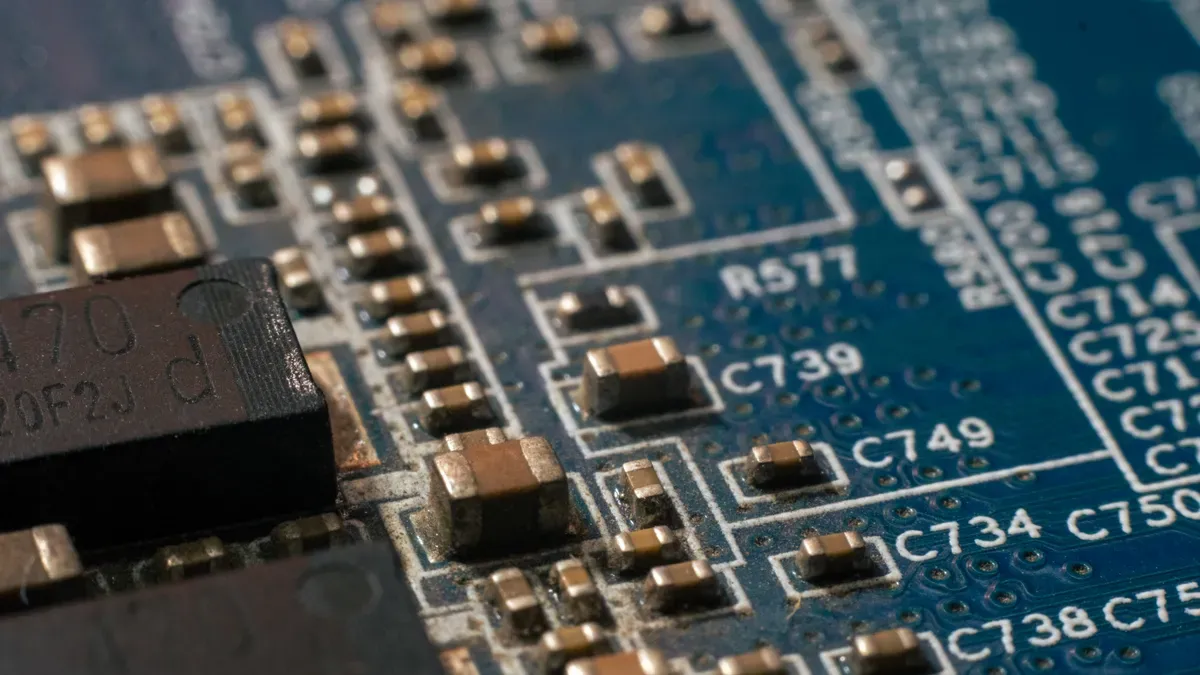
Quick-Turn Service Options
You want your prototype pcb fast. Many online companies can make your boards in just one day. They use instant quote tools. You see the price and delivery time right away. Here are some top quick-turn PCB manufacturers you can look at:
- PCBWay: Good prices and lots of help for hobbyists and startups.
- JLCPCB: Cheap and very quick, great for small boards.
- Sierra: Has advanced DFM tools and support, good for aerospace and medical prototypes.
- MacroFab: Lets you manage builds with a cloud-based interface.
- Bittele: Focuses on small orders and has great customer service, especially for Canadians.
- ALLPCB: Known for SMT abilities, liked by mid-size startups.
- Unit Circuits: Gives quick-turn assembly in 24–72 hours with no minimum order.
- Sunstone: Trusted for high-reliability work in the US.
- Advanced Circuits: Makes high-end and mil-spec boards.
- Proto-Electronics: Fast feedback and easy interface, strong in Europe.
- A-Tech Circuits: Delivers fast for low to medium volumes, in 24 to 72 hours.
- American Standard Circuits: Makes quick-turn PCBs in the US.
- Avanti Circuits Inc.: Offers same-day service for urgent needs.
- JHYPCB: Known for very fast turnaround, sometimes in just 24 hours.
- JSD PCB: Has 48-hour quick-turn options and great customer service.
You can check their usual times for small orders in the table below:
| Manufacturer | Turnaround Time |
|---|---|
| JLCPCB | As fast as 24 hours |
| PCBWay | As fast as 24 hours |
| Unit Circuits | 24–72 hours |
If you need your prototype pcb even faster, many companies offer rush orders. These cost extra, but they save you days when you need your board quickly.
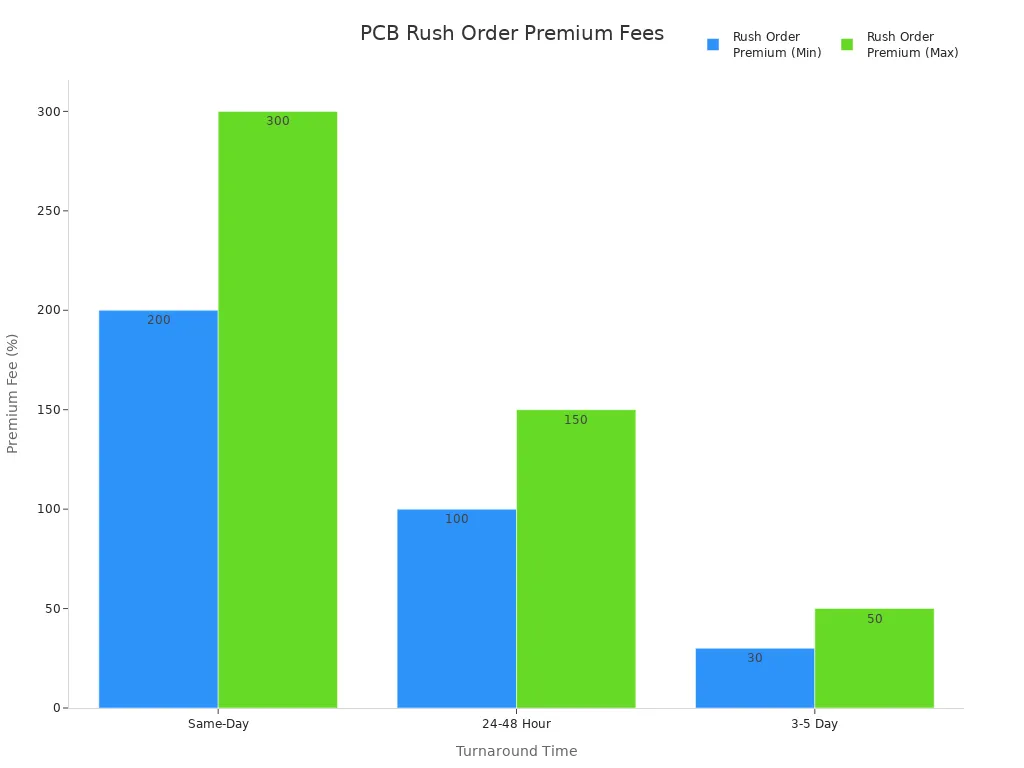
Note: Rush orders cost more. Same-day service can be up to three times the normal price. It is worth it if you have a tight deadline.
What to Look For
You want a company that sends your prototype pcb on time and without mistakes. Here are the most important things to check:
- Fast lead times: Pick companies that promise and deliver quick turnaround.
- Low or no minimum order quantity: Lets you order only what you need.
- Instant online quotes: Saves time and helps you compare prices fast.
- Design for manufacturability (DFM) support: Helps you avoid mistakes before production.
- Short assembly and testing cycles: Makes waiting time shorter.
- Reliable component sourcing: Makes sure your board has all the right parts.
- Expert engineer support: Get help with design and layout if you need it.
- Debugging services: Fix problems early so you do not get delays.
- Fair pricing: Balance cost and quality for the best value.
Order size can change how fast you get your boards. Small orders usually ship faster. Big orders take longer because they need more machine time and materials. Design complexity and material supply also affect how quickly your order gets finished.
Tip: Always check reviews and ask about support before you pick a company. Good communication helps solve problems quickly.
Prepare Prototype PCB Files
Before you place your order, you need to get your design files ready. Good file preparation helps you avoid delays and mistakes. You want your prototype pcb to match your design exactly. This section explains what files you need and how to check them.
Required File Formats
You must send the right files to your manufacturer. Most companies ask for Gerber files. These files show each layer of your board, like copper, solder mask, and silkscreen. Some manufacturers also accept CAD files from your design software. For simple boards, you can use PDF files, but these are not good for complex designs.
Here is a table that shows the most common file formats and what they do:
| File Format | Description |
|---|---|
| Gerber Files | Industry standard files with data for copper layers, solder mask, and drill holes. |
| CAD Files | Files from design tools. Some manufacturers accept these for direct upload. |
| PDF Files | Good for simple boards. Not precise enough for advanced designs. |
You also need to include other documents for a smooth order:
- Bill of Materials (BOM): This lists all the parts you want on your board.
- Centroid file: This shows where each part goes and how it is turned.
- NC Drill file: This tells the factory where to drill holes.
- Board outline: This shows the shape and size of your board.
- Assembly drawings or special instructions: These help the factory understand your design.
- Images or photos: These are optional but can help clear up any confusion.
Tip: Always check the manufacturer’s website for their file requirements. Some companies have special rules.
File Checklist
You want your order to go fast. Missing or wrong files can slow everything down. Use this checklist to make sure your files are complete:
- Export Gerber files for every layer: copper, solder mask, and silkscreen.
- Include a drill file for all holes.
- Add a board outline in the fabrication layer.
- Attach your BOM with correct part numbers and descriptions.
- Provide a centroid file for surface mount parts.
- Add assembly drawings or special instructions if needed.
- Check that all files use clear names with version numbers or dates.
Before you upload, double-check your files:
- Cross-check your design files with the manufacturer’s specs.
- Review tolerances and make sure they match what the factory can do.
- Use a DFM checklist to catch problems before you order.
- Make sure there are no unrouted nets in your design.
- Refill all copper pours and polygons.
- Confirm your schematic and PCB match.
- Run a design rule check (DRC) and fix any errors.
- Check that all reference designators are easy to read.
- Make sure your files are the latest version.
Note: Even one mistake in your files can cause delays or extra costs. Careful checking saves time and money.
If you follow these steps, you will help your manufacturer build your prototype pcb quickly and correctly.
Order Form Tips
Filling Out Details Fast
When you order a prototype pcb, you want it fast. You need to fill out the order form quickly and carefully. Get all your files and info ready before you start. This way, you do not have to stop and search for things.
Most online order forms ask for the same main things. You should have these ready:
- Gerber and drill files
- IPC netlist
- Board outline and mechanical features
- Stack-up needs and impedance targets
- Bill of Materials (BOM) with backup parts
- Pick-and-place files with clear part directions
- Assembly drawings and notes
- Test instructions
Tip: If your files are clear and complete, your order goes faster. Many companies finish jobs up to two days sooner when you give them good files.
You can save time by using auto-fill or upload tools on websites. Some sites let you save your favorite settings for next time. This makes ordering again even quicker.
Avoiding Common Mistakes
Mistakes on the order form can slow your project down. You want to avoid errors that cause delays or extra costs. Always check these things before you send your order:
- Board thickness
- Copper thickness
- Solder mask color
- Silkscreen color
- Quantity and size
Make sure your files match what you put in the form. If you add extra files, like readme files, most factories will not use them. Only upload what the company asks for.
Note: If you are not sure about a field, look at the help section or ask support. Asking questions now can save you days later.
Giving the right information helps the factory build your board right the first time. You get your prototype pcb faster and with fewer problems.
Fast Shipping Options
When you order a prototype PCB, shipping speed matters. You want your boards as soon as possible. Choosing the right shipping method can save you days.
Comparing Delivery Speeds
You have many shipping choices. Express options like DHL, UPS, and FedEx move your package quickly. Standard shipping takes longer but costs less. Look at the table below to see how delivery times compare:
| Shipping Method | Delivery Time (Business Days) |
|---|---|
| DHL | 3-7 |
| UPS | 3-7 |
| FedEx | 4-7 |
| SF Express | Few days (Southeast Asia) |
| Global Standard Shipping | 8-13 |
| EMS | 15-30 |
| PostNL/USPS/China Post | 15-30 |
Express shipping usually takes 3 to 7 business days. Standard shipping can take 8 to 13 working days. If you need your prototype fast, pick express shipping. For less urgent projects, standard shipping works fine.
Tip: Express shipping costs more, but you get your boards much faster. Always check the delivery time before you pay.
Tracking Your Order
You want to know where your order is at every step. Most PCB manufacturers give you tools to track your order in real time. Here is how you can follow your order:
- You get an order number after you confirm your purchase. Tracking starts here.
- Many companies show updates for each stage: manufacturing, assembly, testing, and shipping.
- After your board ships, you get a tracking number for DHL, FedEx, or UPS. You can check the package location online.
- You receive email updates about your order status.
- Customer support can help if you have questions or need more details.
Tracking helps you plan your project. You always know when your prototype PCB will arrive.
Prevent Delays
File and Material Issues
You can stop most delays if you check your files and materials first. Many problems happen when information is missing or not clear. Factories will pause work if they do not understand your files. This wastes time and leads to more questions.
The main reason for delays is here: 👉 Factories need clear details before they start. If stack-up notes are not clear, or part numbers do not match, or instructions are confusing, you will wait longer. Factories stop working if they are not sure what to do. This can mean they have to redo things. Good communication between engineers and buyers helps your prototype PCB arrive on time.
Look out for these common problems:
- If you forget manufacturer part numbers (MPNs), your order can stop.
- If Gerber files and assembly drawings do not match, factories will ask questions.
- If you do not give centroid data for SMT parts, it takes longer.
- If test specs are not clear, production can be delayed.
This table shows how file and material mistakes can slow your project:
| Delay Cause | Typical Delay Added | Prevention Action |
|---|---|---|
| Missing MPNs | 2 – 5 days | Check your BOM for all part numbers |
| Component Shortages | 4 – 52 weeks | Check your BOM before you order |
| Failed DFM Check | 1 – 2 weeks | Ask the factory to review your design |
| Consigned Parts Late | 1 – 3 weeks | Use full turnkey services instead |
| Unclear Test Specs | 2 – 3 days | Write down all test rules in your order |
Always check if your parts are in stock before you order. If one part is missing, your whole order can stop. You can save time by using standard parts and checking your BOM twice.
Communication Best Practices
Clear communication helps you get your prototype PCB on time. You need to share all your design details with your factory. This means stack-up, materials, and test needs.
Here are some best ways to talk with your factory:
- Agree on the layer stack-up and materials.
- Make sure you and the factory know the test rules.
- Share your design rule checks and limits.
- Confirm panelization, plating, and finish types.
- Set clear tolerances and drill sizes.
- Write down test and inspection steps.
- Set delivery and lead time goals.
You should also:
- Keep all your files in one folder.
- Use standard formats like Gerber RS-274X.
- Include all layers and write notes for special needs.
- Give fabrication and assembly drawings.
- Add a BOM with backup parts.
- Write down test and inspection methods.
Tip: When you give clear and complete files, your factory can start right away. This keeps your project on track and stops mistakes that cost money.
You can order a prototype PCB quickly when you prepare your files and use online tools. Many quick-turn services use cloud-based software to speed up every step. You upload your design and get a quote right away. These services help you test ideas, launch products faster, and meet tight deadlines.
- You get reduced lead times and faster development.
- You can validate designs and make changes quickly.
- You reach the market sooner with fewer delays.
Start your order today and see how fast you can get your prototype PCB.
FAQ
How fast can I get a prototype PCB?
You can get a prototype PCB in as little as 24 hours with rush service. Most quick-turn manufacturers offer 1–3 day production for small orders. Choose express shipping for the fastest delivery.
What files do I need to upload?
You need Gerber files, a Bill of Materials (BOM), a drill file, and a board outline. Some factories may ask for a centroid file and assembly drawings. Always check the manufacturer’s requirements.
Can I order just one PCB?
Yes, many quick-turn PCB services let you order just one board. You do not need to buy in bulk. This helps you test your design before making more.
What if I make a mistake in my files?
If you upload the wrong files, your order may be delayed. Double-check everything before you submit. Contact support right away if you find an error.
How do I track my PCB order?
Most manufacturers give you an order number and a tracking link. You can see updates for each step, from production to shipping. Use the tracking number from DHL, FedEx, or UPS to follow your package.