
 English
 Arabic
 Chinese (Simplified)
 Dutch
 French
 German
 Italian
 Portuguese
 Russian
 Spanish

Benefits of a Low-Profile Mechanical Keyboard
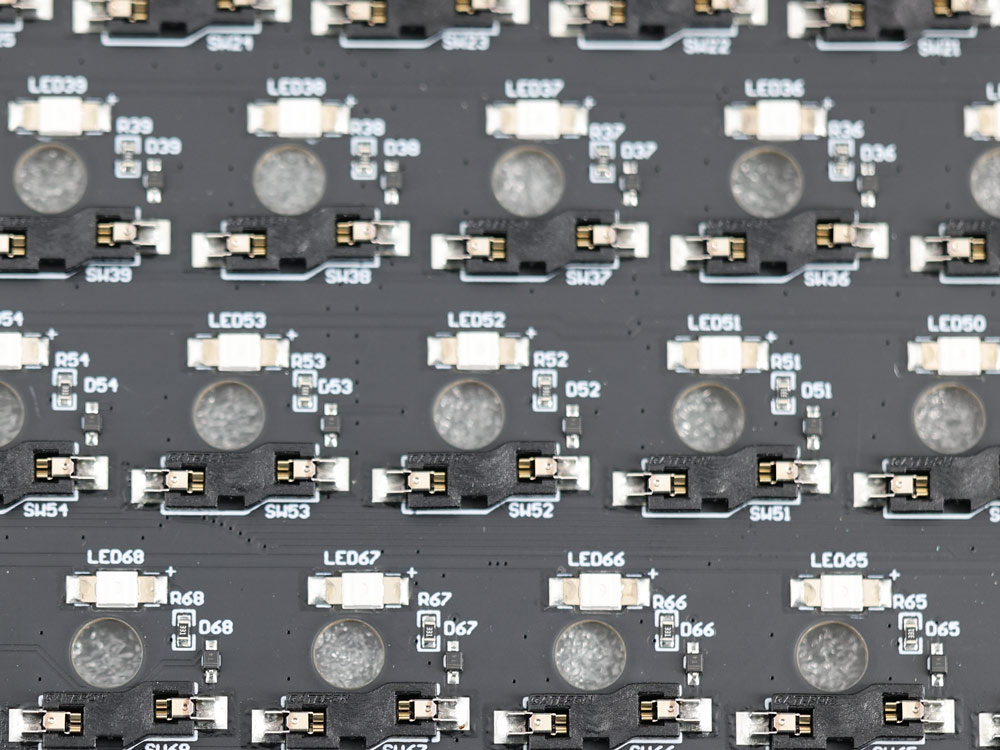
Quick Answer: The Short Answer
Here are the most important ways a low profile keyboard PCB improves thin keyboard designs:
- Reduces Keyboard Thickness: Tailored track layouts and ultra-slim components mean your laptop or desktop peripheral can be up to 30–50% slimmer compared to standard keyboards.
- Accommodates Low Profile Switches: Switches and keycaps with lower travel and reduced height require a PCB with appropriately modified mounting holes, traces, and component clearances.
- Enables Modern Features in a Slim Package: Supports features such as hot-swap switch sockets, per-key RGB lighting, wireless integration, and multi-layer matrix design—all in a confined space.
- Enables Advanced Mechanical Keyboard Customization: With precision switch footprints, hot-swap socket compatibility, and careful matrix routing, you aren’t limited by the thin form factor—you can still have hot-swappable, programmable, or even wireless low profile mechanical keyboards with QMK/VIA support.
- Improves Design Flexibility: By optimizing for thin construction, low profile keyboard PCBs allow more ergonomic designs, travel-friendly shapes, and futuristic aesthetics.
In short: If you’re dreaming of a thinner, lighter, and just as powerful mechanical keyboard or ultra-slim wireless model, the low profile keyboard PCB is the difference-maker, letting designers break free from bulky, old-fashioned boards.
Key Takeaways
- Low profile keyboard PCBs are engineered for thin designs, enabling truly slim mechanical and wireless keyboards without sacrificing sturdiness or functionality.
- These PCBs work with low profile switches and support hot-swap, RGB lighting, and advanced firmware—just like traditional mechanical keyboard PCBs but at a much smaller height.
- Critical factors include PCB thickness, controlled layer stack-up, and precise footprint compatibility for low profile switches and sockets.
- Choosing the right low profile keyboard PCB is vital for maximizing space, achieving ultra-thin builds, and ensuring perfect switch, keycap, and enclosure fit.
- Special manufacturing steps and design tricks are required to guarantee long-term durability, error-free assembly, and flawless key registration.
Introduction
The low profile keyboard revolution has transformed both the look and feel of computing. Whether you’re a gamer, creator, or professional on the move, the quest for slimmer, more portable, and highly customizable keyboards is pushing product designers and engineers to innovate—most crucially at the PCB level.
At the heart of the ultra-slim keyboard movement is the low profile keyboard PCB: a specially crafted printed circuit board that’s far thinner and designed for compatibility with low profile mechanical switches, short keycaps, and ultra-shallow enclosures. By reducing stack height and supporting the latest switch footprints and features, these PCBs underpin modern slim mechanical keyboard design, creating products as sleek as they are high-performance.
What Is a Low Profile Keyboard?
What Does “Low Profile” Mean?
A low profile keyboard is a keyboard built from thinner components, featuring a reduced vertical stack (the total height from desk to keycap top) compared to standard keyboards. This gives it a slender, laptop-like silhouette, generally measuring 18mm or less in height.
What Actually Makes a Keyboard Low-Profile?
- Low profile mechanical switches: These specialty switches (like Cherry MX Low Profile or Kailh Choc) are shorter than traditional switches—sometimes 30–50% lower.
- Low profile keycaps: Keycaps are specifically designed with a shallower profile, providing a lower key travel distance.
- Thin PCB design: The underlying PCB is usually 1.0mm or 1.2mm thick (not 1.6mm), with altered mounting and trace clearances.
- Slim enclosure structure: The keyboard’s chassis, plate, and support layers have less vertical space; the PCB must be precisely engineered for such a build.
Types of Low Profile Keyboards
- Low profile mechanical keyboards: Feature mechanical switches with custom PCBs for thin layouts, hot-swap support, and advanced lighting.
- Low profile membrane keyboards: Use a flat flexible circuit and rubber domes, less common in the enthusiast scene but found in most laptops.
Benefits of Using a Low Profile Keyboard PCB
The shift from bulky to ultra-slim mechanical keyboards brings several compelling benefits:
- Space Optimization:
- Perfect for compact desks, mobile setups, or travel keyboards.
- Can reduce total keyboard height by up to 50% vs. traditional builds.
- Modern Aesthetics:
- Enables sleeker, device-matching designs.
- Matches the minimalist trend in tech hardware and workspace setups.
- Improved Ergonomics:
- Reduces wrist strain by dropping the keyboard closer to desk height.
- Smoother transitions for laptop-to-desktop workflows.
- Customizability Remains:
- Hot-swap sockets, RGB lighting, QMK/VIA support, and n-key rollover are all possible on a thin PCB.
- Innovative Layouts:
- Freed from bulky enclosures, designers can engineer unique shapes, split keyboards, or ultra-compact 60% layouts.
- Technical Flexibility:
- Optimized for both wireless (with antenna keepout) and wired designs.
- Can support advanced features like USB-C, Bluetooth, or RGB underglow.
Fact: Enthusiasts have reported that keyboards with a low profile keyboard PCB and matching switches can improve gaming reaction time, thanks to shorter actuation distances and reduced keystroke travel.
How Does a Low Profile Keyboard PCB Differ from a Standard Keyboard PCB?
| Feature | Standard Keyboard PCB | Low Profile Keyboard PCB |
|---|---|---|
| PCB Thickness | 1.6mm (typical) | 1.0mm–1.2mm (slimmer, lighter) |
| Switch Footprints | Cherry MX, Alps, Gateron, etc. | Specialized low profile (Choc, MX LP) |
| Component Height Clearance | Standard (more vertical room) | Minimal (tight fit) |
| Keycap Support | Standard tall or sculpted | Low profile, short, flat |
| Hot-Swap Support | Easier (more space for sockets) | Precision-required; thin socket types |
| Plate & Enclosure Design | Plates can be thicker | Must use ultra-thin plates |
| Switch Mounting | Soldered or hot-swap (standard) | Soldered or hot-swap (specialized) |
| Mechanical Stack Height | 20–35mm+ | 15mm–20mm (total build) |
In-depth Differences:
- Switch Alignment & Seating: Low profile switch holes are often closer together vertically, requiring careful mechanical stack design, and sockets or through-holes must not interfere with thin plate or case materials.
- Matrix Routing: Tighter PCB and matrix footprints require sharper trace routing and more thoughtful diode placement to prevent crosstalk and ghosting in the smaller space.
- Hot-Swap Socket Engineering: Unlike in standard designs, the hot-swap socket type, height, and pinout must be specially chosen to fit the confined vertical envelope of the PCB stack.
Low-Profile Mechanical vs. Membrane Keyboard
Structure
- Mechanical: Uses discrete switches, either standard or low profile, installed on a PCB with precise alignment. Hot-swap sockets and custom keycap options are available.
- Membrane: Employs flexible membranes with conductive layers; switches are not individual—travel is usually longer, feel is “mushier,” and key rollover is limited.
Mechanism
- Low-Profile Mechanical Keyboards:
- Offer tactility, click, or smooth linear feel.
- Enable advanced customization (NKRO, macros, RGB).
- Long lifespan (often >50 million keystrokes per switch).
- Membrane Keyboards:
- Less modular, limited tactile variation.
- Shorter lifespan.
- Typically non-customizable.
| Comparison Area | Low Profile Mechanical | Membrane |
|---|---|---|
| Durability | Up to 70M keystrokes | ~5M keystrokes |
| Customization | High | Very low |
| Key rollover/NKRO | Full possible | Often limited |
| Typing Feel | Mechanical (varied) | Soft/mushy |
| Replacement Parts | Easily sourced | Not modular |
What Special Manufacturing Processes Does a Low Profile Keyboard Need?
PCB Thickness & Copper Layer
Thin keyboard PCB manufacturing demands tight control of board thickness (often 1.0mm–1.2mm) and careful copper layer management to prevent warping, ensure sufficient current capacity, and accommodate fine signal routing.
Multi-Layer (2-Layer vs. 4-Layer)
Advanced low profile keyboards often require 4-layer PCBs for:
- Extra ground or power planes (for signal integrity, RGB, or wireless modules)
- Dense matrix routing, particularly important with many keys and RGB circuits
Hot Swap vs Soldered Switches
- Hot-Swap Sockets: These require thinner-profile sockets, exact pad footprints, and close PCB tolerances.
- Soldered Switches: Simpler, cheaper to fabricate but less modular. Still, through-hole design must not interfere with ultra-thin enclosures.
Diode Per Key?
- Essential for full n-key rollover and to prevent “ghosting,” especially critical in gaming or high-speed typing.
- Placement must be tightly controlled in thin PCBs to fit beneath low profile switches.
Manufacturing Tips for Low Profile Keyboard PCBs
- Surface Finish & Solder Mask Registration: In thin keyboard PCB manufacturing, the surface finish (ENIG, HASL) and precise solder mask alignment are crucial, as small flaws can cause solder bridging or switch socket misalignments in tight spaces.
- Gerber Files & Assembly Drawings: Always submit complete Gerber files, precise drill files, and detailed assembly drawings that mark low profile switch footprints, hot-swap socket types, and component clearances.
- DFM (Design for Manufacturability): Collaborate with your PCB fabricator for DFM feedback—many offer pre-fabrication reviews to spot issues in thin stack-ups, copper weight, or pad/via tolerances that are unique to low profile PCB assemblies.
- Surface-Mount & Through-Hole Mixed Assembly: For ultra-slim builds, many parts (diodes, resistors, controllers) are SMD, with only switch pins or sockets being through-hole. This hybrid approach balances minimum thickness with assembly strength.
PCB Design Factors for Low Profile Keyboards
A successful low profile keyboard PCB design demands attention to both the electrical and mechanical domain:
PCB Layout and Size
- Slim Outline: Maximize usable PCB space by minimizing border width and using staggered switch matrix arrangements, often with custom cutouts.
- Microcontroller Placement: Place the keyboard microcontroller (e.g., Atmega32u4, STM32) near the board edge to save vertical space and grant easier access to the USB differential pair for wired builds.
Switch Compatibility
- Low Profile Switch Footprint: Select compatible footprints (Kailh Choc V1/V2, MX Low Profile, etc.) and verify against manufacturer datasheets for pinout/leg spacing.
- Hot-Swap Socket Specification: Only use sockets certified for low profile builds (e.g., Kailh Choc low socket)—many regular Mill-Max sockets are too tall.
Customization: Firmware, RGB, Plate/PCB Mounting
- Support for QMK, VIA, or proprietary RGB firmware for deep keymap, macro, and per-key lighting customization.
- Plate mounting vs PCB mounting: plate-mount is lighter and stiffer but requires exact switch-to-plate clearance in a thin design.
Validation & Prototyping
- Prototype Early: Always order a prototype batch for fit and electrical tests before committing to full production.
- Test All Functions: Validate that every socket, LED, mounting hole, and diode works as expected.
- Hot-Swap Testing: Test hot-swap sockets for insertion/removal cycles and ensure they seat low profile switches snugly without instability.
Maximizing Space: Low-Profile Keyboard Footprints
Low-profile keyboard PCB footprints maximize precious vertical and horizontal real estate:
- Narrow Controller & Component Zone: Group controller, diodes, and RGB controllers to one edge or between switch clusters.
- Antenna Keepout (Wireless): Wireless low profile keyboards need strict keepout zones (free of copper or components) for antennas—often at a corner, near the battery, and clearly marked on the silkscreen.
- Matrix Routing: Compact, efficiently routed traces minimize crossing and stacking, reducing EMI risk and making the most of limited PCB surface.
- Switch/Socket Footprint Table Example:
| Switch Type | Pin Count | Hot-Swap Option | Minimum PCB Thickness | Sockets Required | Keycap Compatibility |
|---|---|---|---|---|---|
| Kailh Choc V1 | 3 | Yes | 1.0mm | Kailh Low Socket | Choc/Flat |
| Cherry MX Low Profile | 5 | Yes (custom) | 1.2mm | Mill-Max/Custom | MX LP/Custom |
| Standard MX | 5 | Yes | 1.6mm | Kailh, Mill-Max | Any MX |
Comparison Table: Low Profile vs. Standard Profile PCBs
| Feature | Low Profile Keyboard PCB | Standard Mechanical Keyboard PCB |
|---|---|---|
| PCB Thickness | 1.0mm–1.2mm | 1.6mm |
| Switch Support | Choc, MX Low Profile, Flat cap | Cherry MX, Gateron, Alps |
| Socket/Hot Swap | Kailh Low, custom short sockets | Kailh, Mill-Max (standard) |
| Plate & Case Design | Slim, tight tolerances | Thicker, more interior height |
| Wireless Support | Standard, with antenna keepout | Standard (less focus on antenna) |
| RGB & Backlighting | Supported via SMD LEDs/thin plates | Supported, more space for extras |
| Assembly Difficulty | High (tight tolerances) | Moderate (more margin for error) |
Frequently Asked Questions
Q1: Can a low profile keyboard use a standard mechanical keyboard PCB?
A: No. Standard PCBs are too thick and their switch/diode footprints don’t match low-profile components, creating clearance and mounting problems.
Q2: Should the PCB be two layers or four layers?
A: Two layers suffice for simple, wired builds. Four layers are best for RGB, wireless, or EMI-sensitive designs—especially with advanced lighting or Bluetooth features.
Q3: Is hot swap more difficult to manufacture than soldered switches?
A: Yes, especially in low-profile designs. Hot swap sockets must be thin, flush, and perfectly aligned, increasing both DFM complexity and assembly scrutiny.
Q4: Does every key need a diode?
A: For full NKRO and anti-ghosting, yes—each switch should have its own diode for best results in high-speed gaming or typing.
Q5: What’s the most useful first prototype?
A: A small-scale build (e.g., a 4×6 ortho layout) lets you check socket fit, switch seating, and key matrix before risking a full-size production run.
Q6: Can low-profile switches feel as good as standard switches?
A: Subjective! Some low-profile switches (like Choc V2 tactile) are loved by many for gaming and fast typing, while others miss the deep “thock” of full-size MX switches.
Q7: Why do low-profile keyboards sound different?
A: Less case volume, stiffer materials, and shorter key travel all produce higher-pitched and quieter sound signatures—great for commuting or the office!
Q8: Low-Profile vs. High-Profile: Which should you choose?
A: For travel, portability, and minimalist looks: go low-profile. For long typing sessions and deeper feel, high-profile mechanical keyboards still win loyal fans.
Q9: What are some of the best low-profile keyboards?
A: Logitech G915, Keychron K3/K7, and NuPhy Air75 regularly feature in “best slim keyboard” lists for their blend of feel, features, and ultra-thin PCB engineering.
How to Choose a Low Profile Keyboard & PCB
- Match Switch and Keycap Footprints: Decide if you want Kailh Choc, MX Low Profile, or another variant—then confirm your PCB matches exactly.
- Structure and Layout: Consider ergonomics, split/compact shapes, and if you want wireless, RGB, or hot swap.
- Firmware and Compatibility: Ensure the PCB is compatible with QMK, VIA, or your preferred software for easy macro and keymap setup.
- Assembly and Validation: Check if the board supports easy assembly/testing—look for clear markings, accurate silkscreens, and prototype availability.
- Support & Documentation: Pick PCBs with strong manufacturer support, open-source files, and active community involvement for repairs and upgrades.
- Budget & Availability: Balance customization features with cost—ultra-thin builds and wireless features may increase price but also long-term satisfaction.
Conclusion
Low profile keyboard PCBs are powering a new era of compact, high-performance input devices. They reduce overall keyboard thickness, enable modern feature sets (hot swap, RGB, wireless), and provide outstanding ergonomics for travel-loving enthusiasts, gamers, and professionals alike.
Far from being “just another part,” the low profile keyboard PCB is the key to unlocking slim, strong, and customizable keyboards that rival or surpass their “full height” counterparts. By using a carefully selected, well-manufactured thin PCB, you embrace both sleek aesthetics and modern engineering—no compromise needed.