 English
 Arabic
 Chinese (Simplified)
 Dutch
Dutch French
 German
 Italian
 Portuguese
 Russian
 Spanish
How to Bridge the Gap Between PCB Design and Fabrication in 2026

You need to work closely with fabrication services to do well in pcb design fabrication. Talking early helps stop delays and expensive mistakes. The table below shows how working together early saves money and lowers project failures:
| Evidence Type | Description |
|---|---|
| Cost Savings | Prototypes that cost $5-$20 can find problems that may cost thousands to fix later. |
| Manufacturing Savings | Good design can cut costs by 15-25%. |
| Project Failure Rate | One out of three IoT projects fails because of bad PCB design and finding problems too late. |
| Budget Overruns | IoT projects often go over budget by 45% because people do not talk early enough. |
When both sides understand each other, your designs fit what factories can do. Workflow tools like PLM systems help manage data and changes for easier handoffs.
Key Takeaways
- Talk to your fabricator early so you do not make expensive mistakes or have delays.
- Give clear and full documents so everyone knows the design and what is needed.
- Ask your fabricator to help with the design so you can find problems before making the product.
- Use Design for Manufacturability (DFM) rules to make PCB designs that work well and do not cost too much.
- Use digital feedback tools to help people work together and make the design review easier.
Key Challenges in PCB Design Fabrication
Communication Gaps
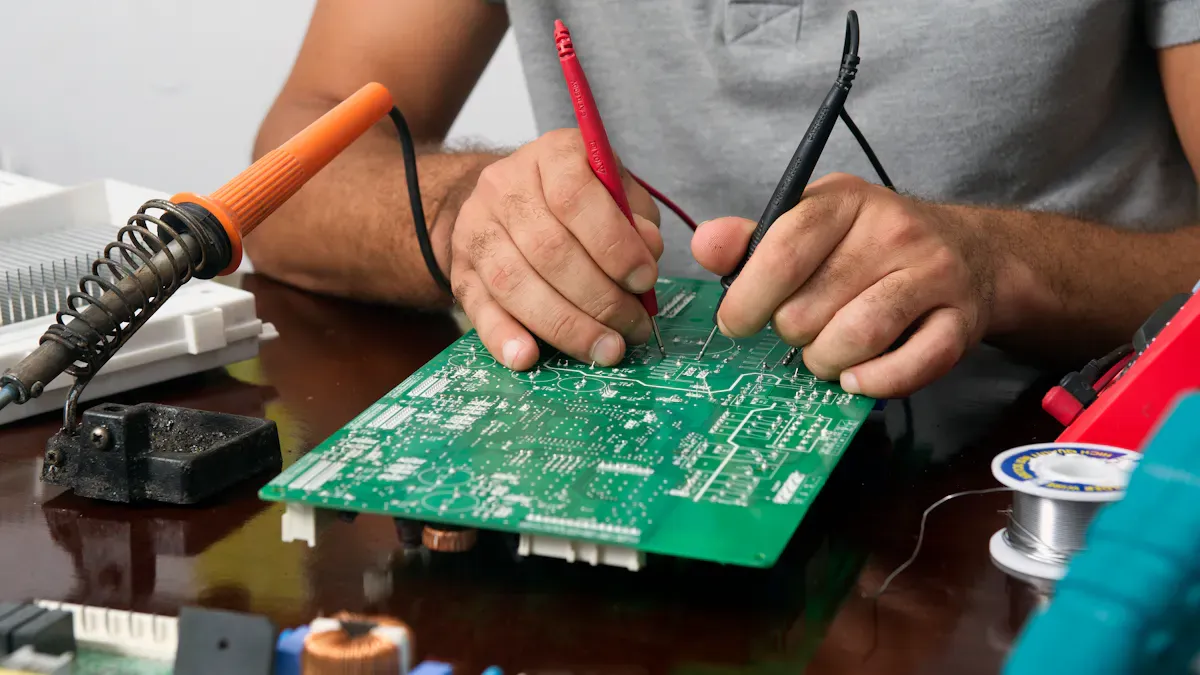
You can run into communication problems during pcb design fabrication. These problems happen when you do not share enough details or use unclear instructions. The table below shows common mistakes, their effects, and how to avoid them:
| Pitfall | Description | Consequences | Mitigation |
|---|---|---|---|
| Over-specification and tight tolerances | You might make trace widths or via sizes too tight for the factory. | This makes things cost more and causes delays. | Design using standard guidelines. |
| Complex stack-ups and microvias without planning | You may ask for special layers or vias without checking if they are possible. | This can stop production and increase scrap risk. | Review stack-up with your fabricator early. |
| Incomplete or unclear documentation | Missing or mixed-up files can confuse the factory. | This leads to delays and wrong boards. | Double-check all outputs for clarity. |
| Poor component placement and orientation | Placing parts for your convenience can cause problems in assembly. | This slows down production and raises defects. | Align parts and review assembly needs. |
If you do not fix these problems, your PCBs may fail when used. For example, a solder bridge in a car’s braking system PCB can cause brake failure and accidents.
Misaligned Capabilities
Trouble can happen if your design does not match what the factory can build. This mismatch can lead to poor teamwork and wasted time. Here are some ways this happens:
- You think the factory can place any part anywhere, but they cannot.
- Delays in sharing updates can cause mechanical failures.
- You may not use accurate drawings or 3D models, so parts do not fit.
To avoid these problems, you should:
- Use accurate mechanical drawings and 3D models.
- Check your design in ECAD tools.
- Work closely with both electronic and mechanical teams.
If you skip these steps, you may face costly reworks and longer production times.
Error Sources
Many errors can sneak into pcb design fabrication. Some common sources include:
| Error Type | Description | Solutions |
|---|---|---|
| Incorrect surface finish | You may not pick the right finish, leading to solder problems. | Always state finish type and thickness. |
| Overlooked mechanical constraints | Missing details can cause routing and function issues. | Define all features on a special layer. |
| Missing or wrong info in files | Errors in files can delay production. | Review all outputs for accuracy. |
Other mistakes include not leaving enough space between features, missing plating details, or unclear milling instructions. These errors can make devices fail. For example, a pad lifting issue in a smartphone PCB can cause the phone to stop working. In medical devices, a small error can even put lives at risk.
By knowing these challenges, you can make pcb design fabrication better, faster, and more reliable.
Optimizing PCB Design Fabrication Collaboration

You can make pcb design fabrication better by bringing design and manufacturing teams together early. Using the right tools and sharing info helps everyone work as a team. This part explains how to use shared documents, get fabricators involved early, and use digital feedback tools.
Shared Documentation
You should give clear and full documents to your team and fabricator. Good documents help everyone see the same facts. Cloud platforms let you share files and get feedback quickly.
The manufacturer can add comments right in the Altium 365 workspace if something needs to change before making the board. It is easier to review designs when you share PCB data with manufacturers using the cloud.
When you use shared documents, you stop mistakes and confusion. You also make reviews faster and help everyone understand the design. Keep all files in one spot and use simple names for each file.
Early Fabricator Involvement
Ask your fabricator to join the project early. This helps you find problems before they cost a lot. Early talks can save time and money.
| Aspect | Cost Estimate |
|---|---|
| Cost of Late Re-spin | $15,000 – $50,000+ |
| Cost of Early Engagement | Small upfront cost (a few hours of engineering time) |
| Expected Value of Early Engagement | $6,000 (if it stops a 20% chance of a big re-spin) |
When you bring your fabricator in early, you can:
- Review your design with experts.
- Find mistakes before making the board.
- Stop expensive changes later.
You can use these ideas to add manufacturing rules to your work:
- Use standard parts to stop sourcing delays.
- Use fewer unique parts.
- Make sure all parts fit with automated assembly.
- Label all parts clearly.
Follow these steps for better results:
- Review your design input with your fabricator.
- Get feedback on risky features or mismatches.
- Change your layout to help soldering and inspection.
Doing this cuts delays and scrap. It also makes sure your pcb design fabrication matches what the factory can do.
Digital Feedback Tools
Digital tools help your team talk and share ideas. These tools let you comment on designs, track changes, and fix problems fast.
- MakeSafe used Altium for teamwork in real time. All team members could join, even from far away. This made reviews faster and clearer.
- Luxonis used Altium to cut mistakes from version control. They used comments to make sure everyone understood the design.
You can set up a feedback system by doing these steps:
- Decide what you want to improve, like signal quality or part placement.
- Pick a platform that fits your team and budget.
- Make surveys or open feedback forms for technical ideas.
- Link feedback to tools like Jira or GitHub.
- Invite all teams—hardware, firmware, and manufacturing—to join.
- Use AI or voting to pick the best ideas.
- Assign tasks and track progress with dashboards.
- Update your feedback process often.
Using these tools makes pcb design fabrication smoother and more reliable. You help everyone work together and catch errors before they cause trouble.
Best Practices for Integration
Design for Manufacturability (DFM)
You can make pcb design fabrication easier by using DFM steps. These steps help you stop mistakes and make your board simple to build.
- Make pad sizes and spacing big enough for machines.
- Set up your parts so assembly lines can work fast.
- Think about heat and strength so your board does not bend or get too hot.
- Keep parts easy to reach so soldering and checking are not hard.
- Match trace and via designs to what the factory can do.
- Put fiducials and parts in the right spots for both surface-mount and through-hole.
- Leave at least 5 mils between fine-pitch leads.
- Follow J-STD-001J for good solder joints.
Tip: Using DFM rules helps your manufacturer build your board faster and with fewer mistakes.
Grouping Components
Putting parts together on your board helps a lot. You make traces shorter, so your layout is easier and you have fewer mistakes. You also keep noisy parts away from sensitive ones, so signals are better and there is less interference.
- If parts face the same way, machines can work faster and easier.
- Grouping parts helps DFM, so inspectors can check your board quickly.
- You get more boards right the first time, so you fix less.
Note: Try to keep similar parts close and facing the same way. This makes assembly and checking easier.
Design File Quality
Good design files help your manufacturer know how to build your board. You should use industry standards for your files.
| Standard Code | Description |
|---|---|
| IPC-2221 | Basic rules for layout, materials, and performance. |
| IPC-2581 | Puts fabrication and assembly info in one file. |
| IPC-6012 | Sets quality and performance for rigid boards. |
| J-STD-001 | Guides soldering and assembly. |
| ISO 9001 | Quality control for manufacturers. |
Check your files for mistakes and make sure they have all details. Clear files stop delays and errors in pcb design fabrication.
Avoiding Pitfalls in PCB Design and Fabrication
Overlooking Tolerances
You must watch tolerances in your PCB design. If you miss them, you can have big problems. Microvias may not hit their capture pads. This can cause open circuits or weak connections. Soldermask can move and leave copper showing. This makes your board more likely to fail. Traces can get too close to pads. This leads to electrical test problems. When you forget tolerances, your yield goes down. Costs go up and build times get longer.
Tip: Always check your design rules for spacing, hole sizes, and mask alignment. This helps you stop expensive mistakes and keeps your boards reliable.
Incomplete Requirements
If you do not give all requirements, your PCB may not work right. You might see electrical failures like shorts or crosstalk. These can stop your board from working. Signal interference can hurt how your board works. Tight clearances can make building harder and cause mistakes. You may pay more if you need to redesign or wait for production.
Here are some common issues from incomplete requirements:
- Electrical failures from shorts and crosstalk
- Signal interference that hurts your board’s performance
- Manufacturing problems from tight clearances
- Higher costs from redesigns or delays
Make sure you share all your needs with your fabricator. Clear and full requirements help everyone avoid surprises.
Skipping Process Controls
You should not skip process controls during PCB production. Without checks and tests, defects can sneak through. Broken traces, short circuits, and bad solder mask coverage may not show up right away. They can cause big failures later. These problems can hurt your product and upset your customers.
Some common pitfalls you should watch for include:
- Picking the wrong design tool, which can slow your project and raise costs.
- Not involving your fabricator early, which can lead to expensive redesigns.
- Ignoring available design tools, which can cause big mistakes.
Note: Always use process controls like inspections and tests. They help you catch problems early and keep your boards high quality.
Benefits of Bridging the Gap
Higher Quality and Reliability
Working with your fabricator helps your PCB work better. You mix design and manufacturing knowledge to get good results. Simulation tools let you see how your board will act before making it. ECAD and MCAD systems help you check your design for mistakes.
- You and your fabricator pick materials and board stack-up together.
- You can review your board for manufacturability before showing it to customers.
- You make sure your board meets all needs and works right.
“Design requirements are very important for making a good PCB. Following rules helps the PCB get made correctly and keeps quality and reliability high.”
Faster Production
Production goes faster when you connect design and fabrication early. Talking to your fabricator early helps you find risks and fix them fast. Prototyping lets you test if your board can be made and find problems before making lots of boards. Digital tools and model-based engineering make things quicker and more accurate.
- Early teamwork cuts down on rework and delays.
- Quick-turn services can make simple boards in 5 days and complex boards in 7-8 days.
- You can make more boards quickly if you need them.
| Production Type | Typical Timeline |
|---|---|
| Traditional PCB | Weeks or months |
| Quick-turn PCB | 5-10 working days |
Cost Reduction
You spend less money by joining design and fabrication together. Knowing how factories work helps you make layouts that are easier and cheaper to build. Good designs stop mistakes and expensive fixes.
- Working together makes designs more efficient.
- You use DFM guidelines when you design.
- You design PCBs so they are easy to make and have fewer errors.
Knowing your fabricator’s process and skills helps you match your design to what they can do. This stops problems and makes production smoother.
You save money, get better quality, and finish products faster when you bridge the gap between PCB design and fabrication.
You can close the gap between PCB design and fabrication by using 3D modeling and checking design rules. Clear component libraries help everyone understand the parts. If you work with your fabricator early, you make fewer mistakes and finish faster. Use good habits like sharing all data and doing DFM reviews often to stop problems.
Good teamwork and talking often help you make better boards, save money, and work faster.
Keep giving feedback and changing your process so your PCBs are always reliable and high quality.
FAQ
What is the best way to share PCB design files with a fabricator?
You can use cloud tools like Altium 365 or Dropbox. These tools let you upload files and get feedback. They help keep your files neat and easy to find. Always use clear names for your files and standard formats.
How early should you involve your fabricator in the design process?
Ask your fabricator to join at the very start. Early help lets you find problems sooner. You can save money and avoid delays.
Why do PCB designs fail during fabrication?
PCB designs fail if you miss tolerances or skip checks. Sending incomplete requirements can also cause problems. You can stop failures by checking your files and talking with your fabricator often.
What documents do you need for PCB fabrication?
You need Gerber files, Bill of Materials (BOM), assembly drawings, and test instructions.
Tip: Always check your documents twice before sending them.
How can you reduce PCB production costs?
You can use standard parts and follow DFM rules. Grouping parts also helps lower costs.
| Method | Cost Saving |
|---|---|
| Standard Parts | High |
| DFM Guidelines | Medium |
| Grouping Parts | Medium |